 SURVIVAL APPS
TRAUTOK STATION: my personal dashboard running on Python stdlib and SQLite
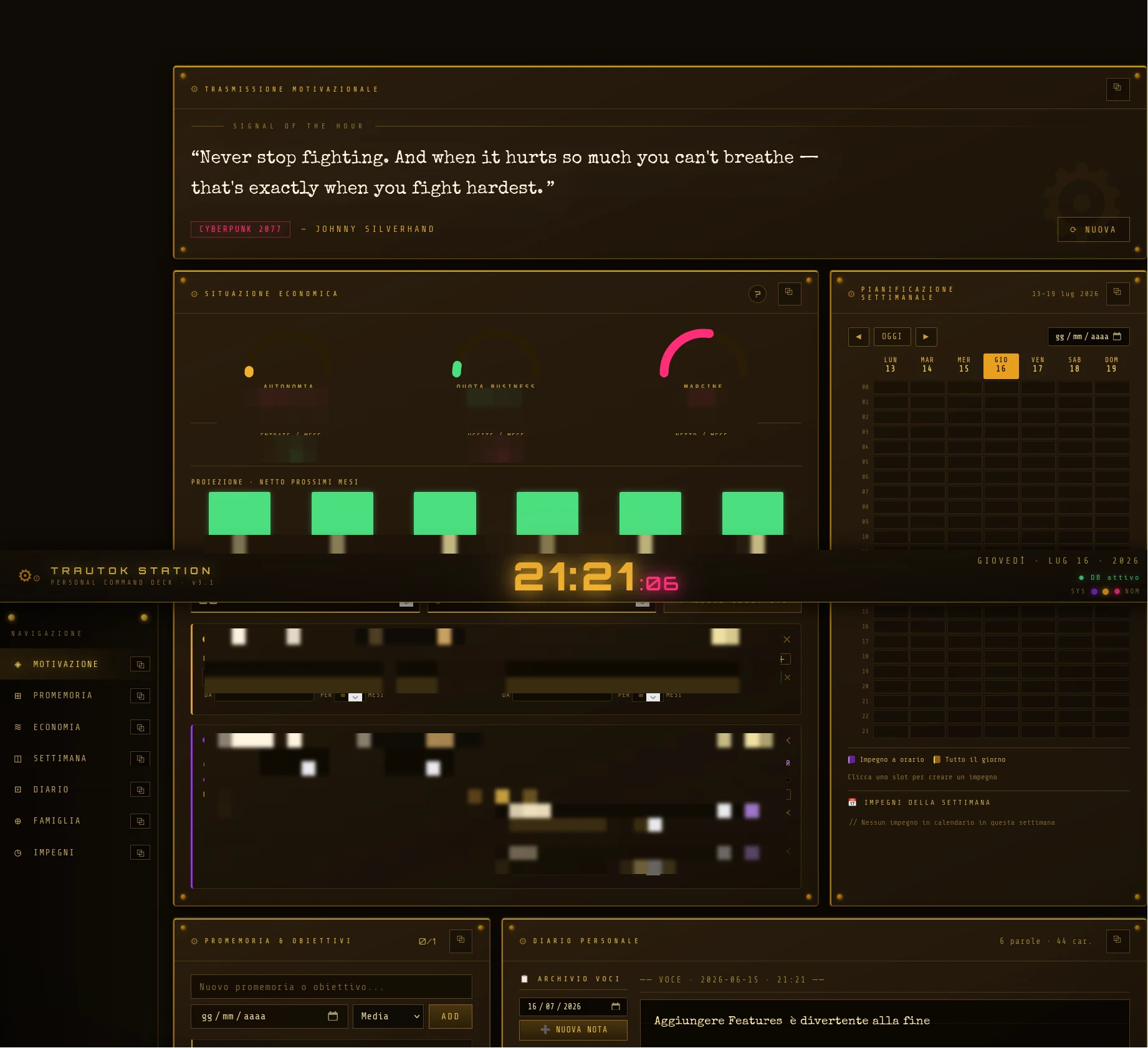
There's one screen I keep open more than any other. It isn't a product, it has no users, and it doesn't need to please anyone but me. It's the cockpit I check my day from — and like every tool I actually use, I built it to hold up: two files, no dependency I couldn't lose without going under. The construct calls it a station. I call it the place where I work out where I stand.
What a personal "command deck" is
The TRAUTOK STATION is a personal dashboard: a single page where everything that would otherwise be scattered across ten different apps comes together — a quote to start with, the things to do, my finances, the week, the journal, the map of the people who matter. I didn't build it to sell it: I built it because I needed one place to look at, and because I wanted that place to be mine in the most literal sense — code I understand, data sitting in a file I can open with my own hands.
It's a Zone 1 project in its most honest form: a tool born from a real problem, mine first of all. This is the build log of what's inside.
How it's built: two files and nothing else
The whole dashboard lives in two pieces, and the split is clean:
- ONE UI FILE —
trautok-dashboard.html: the structure, all the CSS and all the JavaScript live inline in that single file. The only external resource is Google Fonts (Orbitron, Share Tech Mono, Special Elite). No bundler, no framework, no build pipeline to memorize. - ONE STDLIB SERVER —
launcher.py: an HTTP server written with nothing but Python's standard library[1] (http.server+sqlite3). It serves the page and exposes a small REST API backed by a local SQLite database atdata/trautok.db. You start it withpython3 launcher.pyonlocalhost:8765, and it creates the DB on first run if it doesn't exist. - ONE EXCEPTION, OPTIONAL — the Google Calendar integration. The Google libraries are imported lazily, only when a calendar endpoint is hit: if they aren't installed, the server still starts and every other panel works. The heavy dependency is confined where it's needed, and it can be amputated without killing the rest.
- NO BUILD, NO TEST SUITE, NO LINTER — you edit the two files and that's it. It's a choice, not laziness: the fewer layers between me and the program, the longer the program survives me forgetting about it for six months.
The seven panels
The interface is a CSS grid of seven panels, each self-contained:
- MOTIVATION — a "signal of the moment" quote pulled from a static array, typed out on screen with a typewriter effect. It starts right away and doesn't wait for the server.
- TASKS — things to do with deadlines and priorities, checkable.
- ECONOMY — not a fixed snapshot, but a list of goals (project, family, savings, taxes), each with its own income and expense entries. At the top, three semicircle gauges drawn in SVG — autonomy, business share, margin — and a mini chart projecting net income over the next six months.
- WEEKLY PLANNING — the grid of the current week, with today highlighted, with Google Calendar events overlaid on top.
- JOURNAL — dated, standalone notes with autosave.
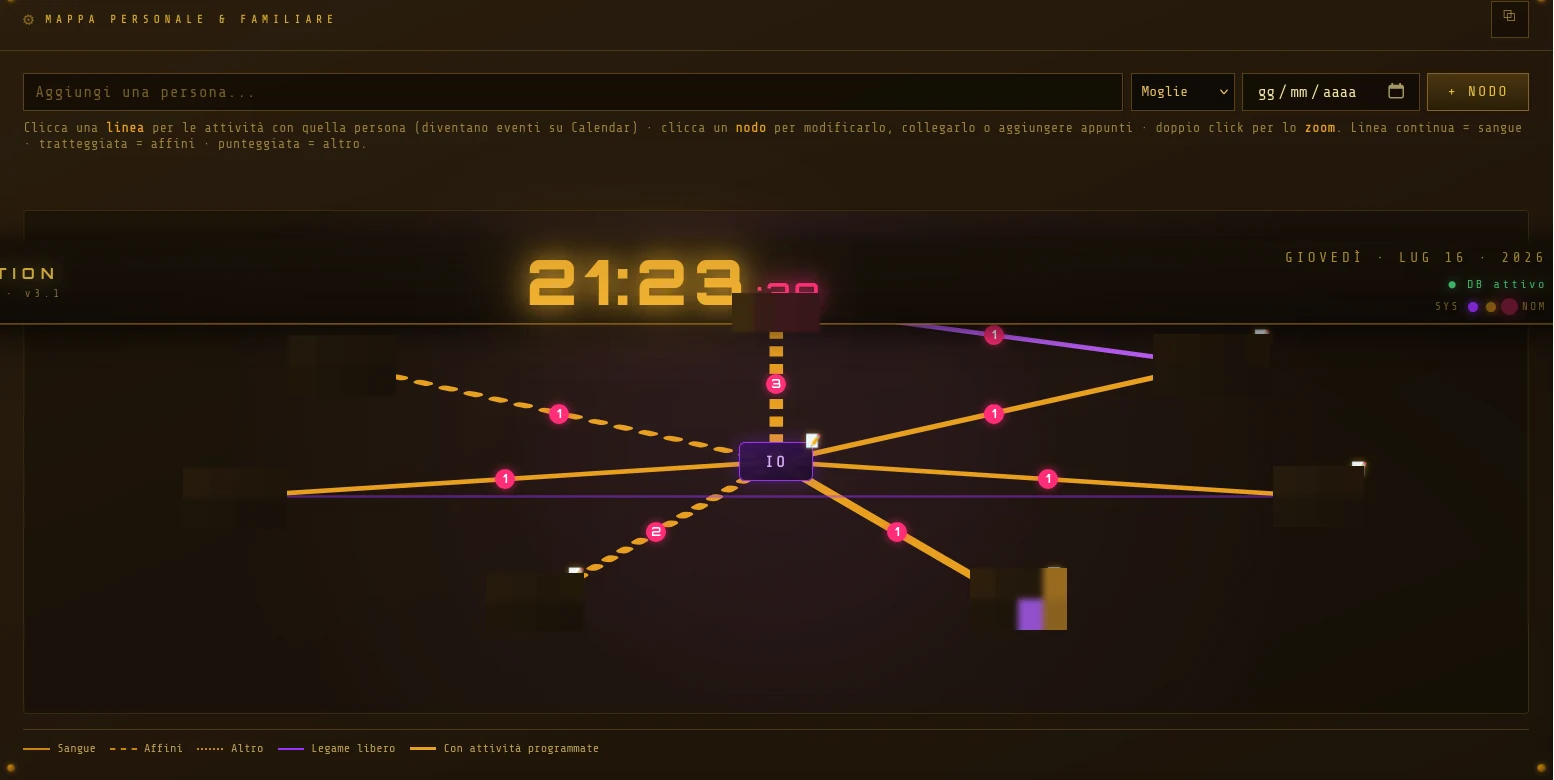
- FAMILY — the relationship map, which I'll get to in a moment.
- CALENDAR — the agenda of upcoming commitments, separate from the week view, with adding and deleting of events.

The relationship map
The panel I'm proudest of is Family, and it's a real node map. In the middle sits the ME node; the people are arranged on a circle around it, joined by lines. The lines aren't decoration: the line style encodes the type of bond — solid for blood, dashed for in-laws, dotted for everyone else. On top of these there are free-form links from person to person, each with its own style.
- CLICKABLE SVG EDGES — every connection is an SVG line with a wider transparent stroke laid over it to act as the click target. Clicking an edge opens the checklist of activities with that person; each activity can be sent as an event to Google Calendar (
"<activity> · with <person>"). - ZOOM AND FOCUS — double-click a node and the view centers on it with a CSS
transform; non-neighbors fade out. There's also an "only people connected to X" filter to thin things out as the nodes multiply. - PER-NODE NOTES — every person (and the ME node) has their own free-text notes, with a small badge when they're not empty.
The data flow (offline-first)
This is the part that really matters. The source of truth is SQLite[2], not the browser. The page's JavaScript never writes straight to localStorage: there's a single write point, persist(store, value), which first saves a lossless local backup and then, if the server is online, sends a PUT /api/<store>. Every save function goes through it.
On load, a GET /api/all fills all the stores (tasks, budget, journal, family) in one shot. If that call fails — say I opened the file via file://, with no server — the dashboard slips into offline mode: it shows a banner, lights up the DB offline badge and reads from the local backup. localStorage isn't the archive: it's the lifeboat. And if the DB is empty but a backup exists, the page re-imports it on its own, once.
> ui: 1 html file (css + js inline) · only external dep: google fonts
> server: python http.server + sqlite3 (stdlib) · localhost:8765
> truth: sqlite → data/trautok.db · localStorage = offline backup only
> api: GET /api/all · PUT /api/<store> (atomic replace)
> calendar: google, import lazy · missing → the rest lives
Why stdlib and no framework
The obvious question: why hurt yourself with http.server when there are frameworks that give you everything in three lines? The answer is the same one that runs through everything I publish here. A personal tool I use every day has to pass one specific test: if the third-party service disappeared, does the project live? With two files of pure standard library and one SQLite file, the answer is yes. Google Calendar can detach tomorrow and I lose a panel, not the station.
It's the principle behind the return to self-hosting applied on a small scale, and the same pact I made with myself when I started writing code with an agent: use the tools of the present, but stay able to survive their absence. A dashboard that depends on half the Internet isn't a cockpit, it's one more thing that can break.
Frequently asked questions
What stack does this dashboard use?
Two files: a trautok-dashboard.html with inline CSS and JavaScript (the only external dependency is Google Fonts) and a launcher.py that is an HTTP server built on nothing but the Python standard library (http.server + sqlite3). No framework, no bundler, no build step.
Where is the data stored?
In a local SQLite database, the file data/trautok.db. The browser's localStorage is used only as an emergency backup when the server can't be reached, not as the main archive.
Does it work without a connection?
Yes, in two senses. Everything runs locally, so you don't need the Internet to use it. And if I open the page without the server running, it goes into offline mode: warning banner, "DB offline" badge and reading from the local backup. The only piece that needs the network is the optional Google Calendar integration.
I close the laptop and the station stays there, in its file of a few megabytes. No cloud to thank, no subscription that expires. May your cockpit survive the apocalypse — and above all, survive you forgetting about it.
Notes
- stdlib (standard library) — the set of modules that ship with Python without installing anything. Here the two pillars are
http.server(a basic HTTP server) andsqlite3(the interface to the SQLite database). Fewer external dependencies = fewer things that break over time. ↑ back to text - SQLite — a relational database that lives in a single file on disk, with no separate server. The server opens one connection per request in WAL mode, which works with the multi-threaded server. ↑ back to text