 SURVIVAL APPS
€co-Survivor: Managing Your Finances Like a Survivor (React Native + Expo)
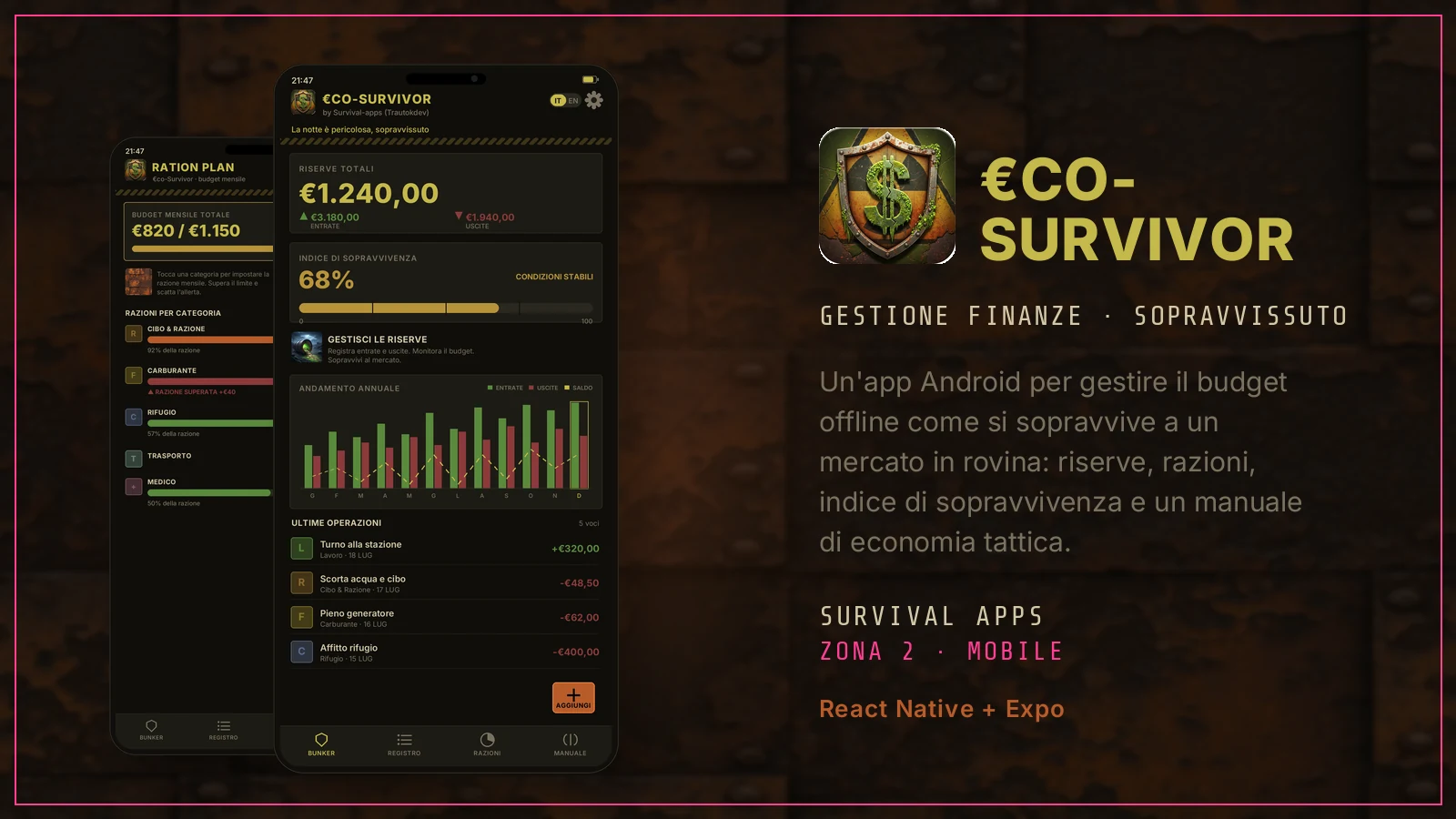
A market never collapses all at once: it crumbles one line of the balance sheet at a time, usually while you're looking the other way. This is an app for people who decided to look. They call it a finance manager; in its own language, every euro you don't spend is one more ration to get you through the winter.
What €co-Survivor is
€co-Survivor is an Android app for managing personal finances, dressed up as a survival manual. The idea is simple: treat your budget like the supplies in a bunker. Income and expenses become reserves, category budgets become rations, and a survival index tells you, with a single number, how long you'd last at your current pace. Alongside it there's a field manual: ten chapters of economics education — inflation, the emergency fund, the 50/30/20 rule, compound interest — written in the same tactical language.
The framing is theatrical, but the craft underneath is concrete: an offline budget tracker, with no account, no cloud, no ads. Everything you write stays on your phone. It's a Zone 2 project in its most direct form: a mobile app, from concept to build, shown as it's made on the inside.
How it's built
€co-Survivor is a React Native app built with Expo[1]: not native Kotlin, and not a Capacitor wrapper. That choice pays off in development speed and in a single TypeScript codebase that describes every screen.
- REACT NATIVE + EXPO — React Native 0.81 on Expo 54 (managed workflow), with the New Architecture enabled and the React Compiler. Navigation is expo-router[2]: routes come from files, and the four tabs at the bottom are a tab navigator.
- DATA ON THE DEVICE — no remote database, no network calls. Everything is saved locally with AsyncStorage[3], the phone's key-value store, under three keys: transactions, budgets and language. Close the app, reopen it, and the data is still there — without ever having passed through a server.
- OFFLINE BY DESIGN — it doesn't “work offline too”: it's only offline. There's no login, no sync, no artificial intelligence crunching your transactions in the cloud. Privacy here isn't a promise, it's the absence of anyone the data could reach.
- TWO CONTEXTS, ONE BRAIN — state lives in two React contexts: one for finances (transactions, budgets, totals and the survival index) and one for language (Italian/English, with a translator that feeds every label). Everything else is components reading from here.
- HAND-DRAWN IN SVG — the yearly chart, the index bar, the hazard-tape badges and the textures are react-native-svg, not images. Inter font, Feather icons, a touch of haptics when you log an entry. There's only one aesthetic: rusted metal, toxic gold, blood red.
The survival index
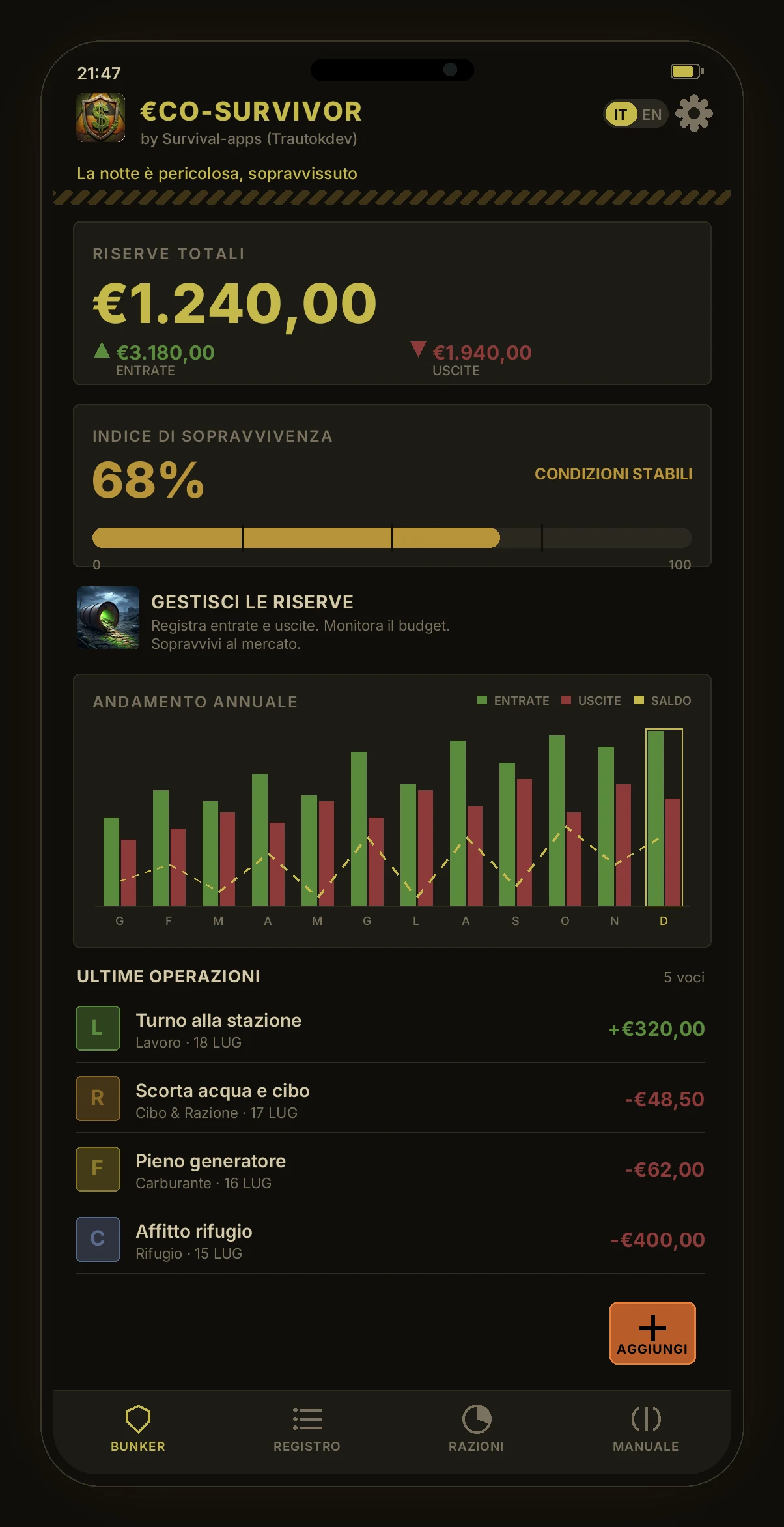
The number that holds everything together is the survival index, from 0 to 100. It isn't an arbitrary grade: it starts from the savings rate — how much of your income is left after expenses. Breaking even is worth about 40; saving half of what comes in pushes you toward 80; spending more than you earn drags the number toward zero. On top of that base works the ration discipline: if you respect your category budgets the index gains a few points, if you blow through them it drops. Anyone spending with no income goes straight into critical condition.
On screen the number doesn't just appear: the bar fills with an animation lasting a little over a second, and the label changes color — from “optimal survival” in green down to “critical condition” in red. It's honest gamification: it doesn't promise you wealth, it tells you how well you're holding up.
The four screens
The app is a bar of four tabs, each with a barracks-style name:
- BUNKER — the dashboard. At the top the total reserves (the balance, which turns red if you go under), below it the survival index, then a chart of the last twelve months with income, expenses and the net balance line, and finally the latest operations. The ADD button starts here.
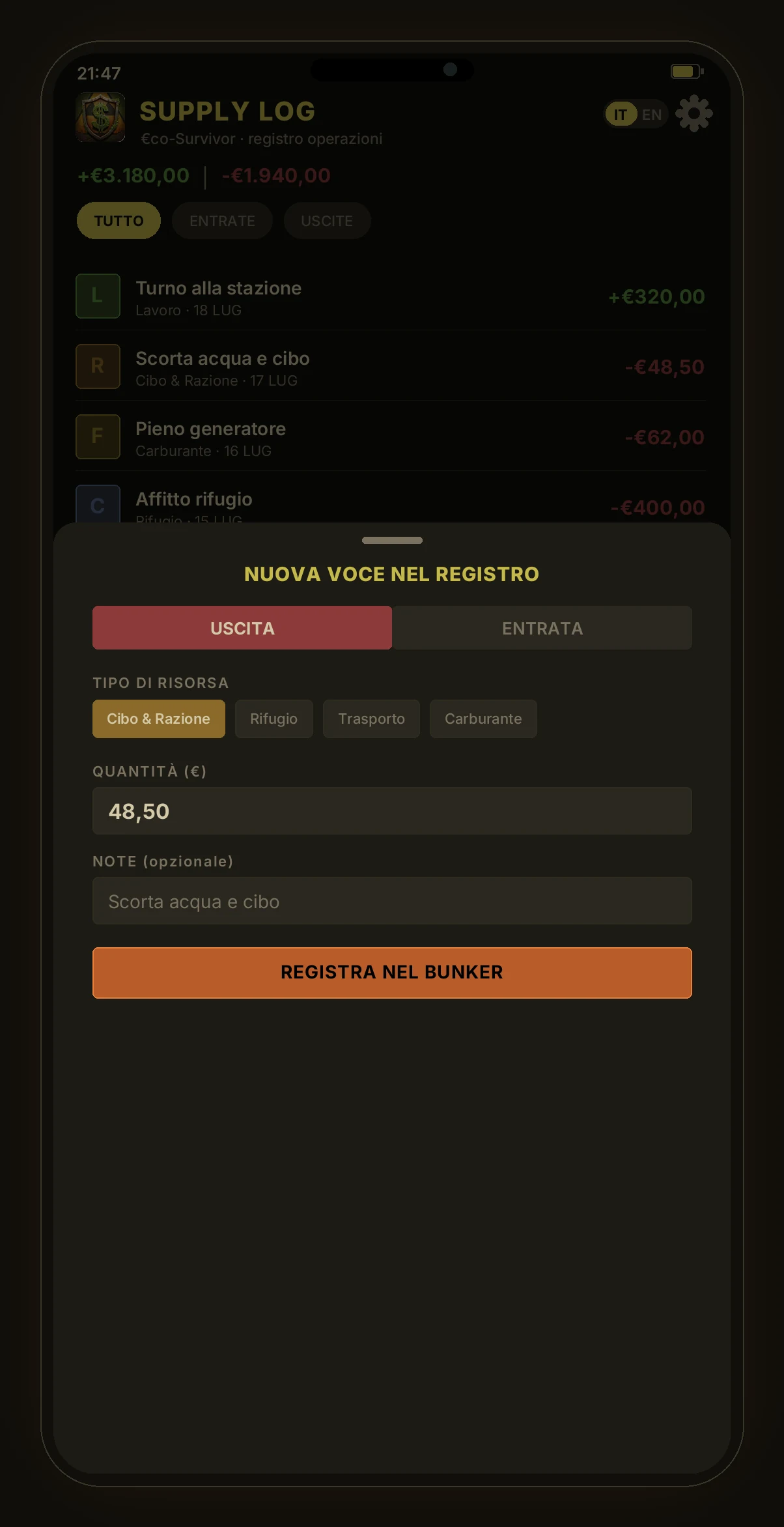
- LOG (Supply Log) — the journal of all operations, filterable by all / income / expenses. Each entry has its category, date and signed amount; a long press deletes it, with confirmation.
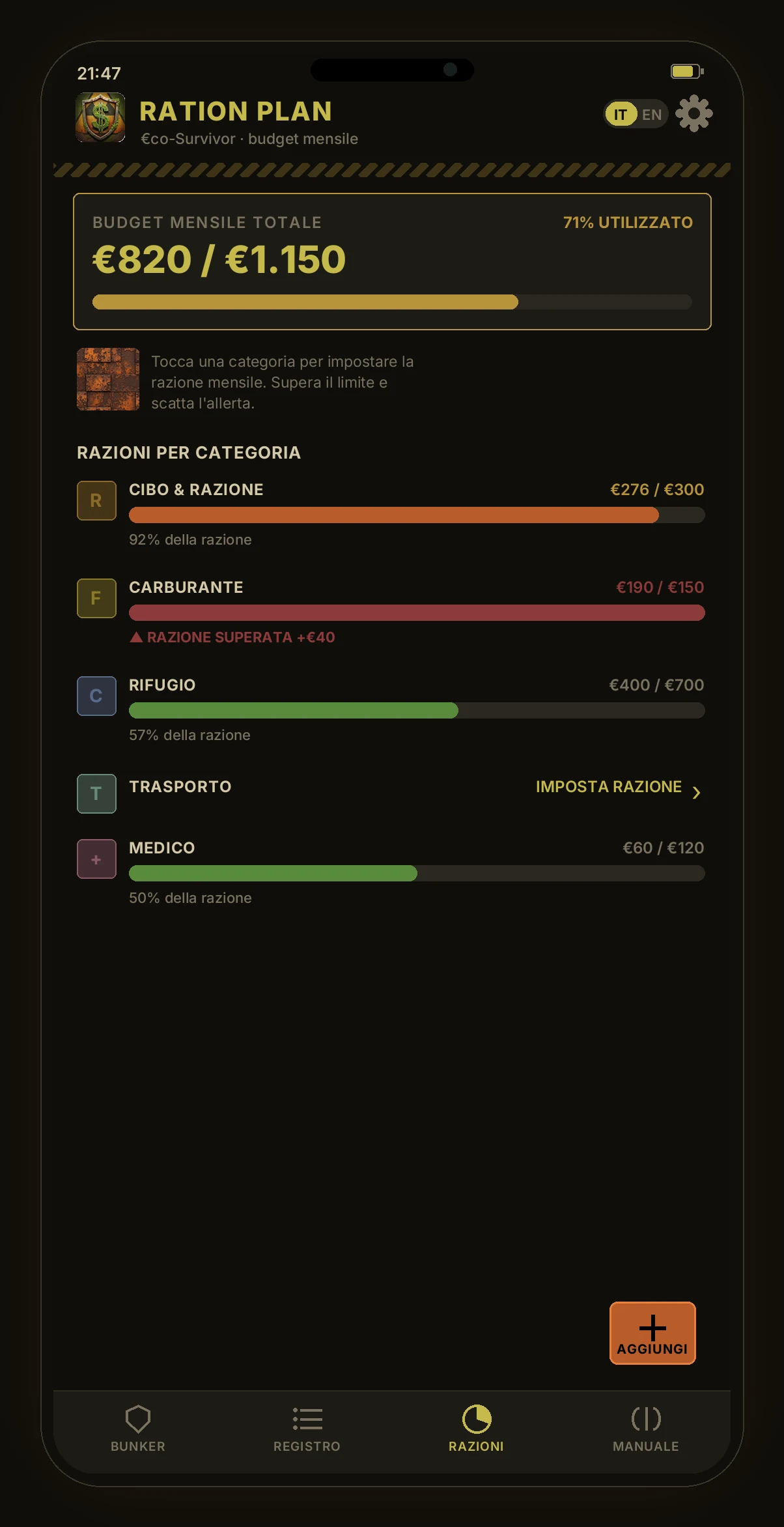
- RATIONS (Ration Plan) — monthly budgets by category. You set a limit and the bar fills as you spend: green while you're on track, orange as you get close, red with a “ration exceeded” when you blow through it.
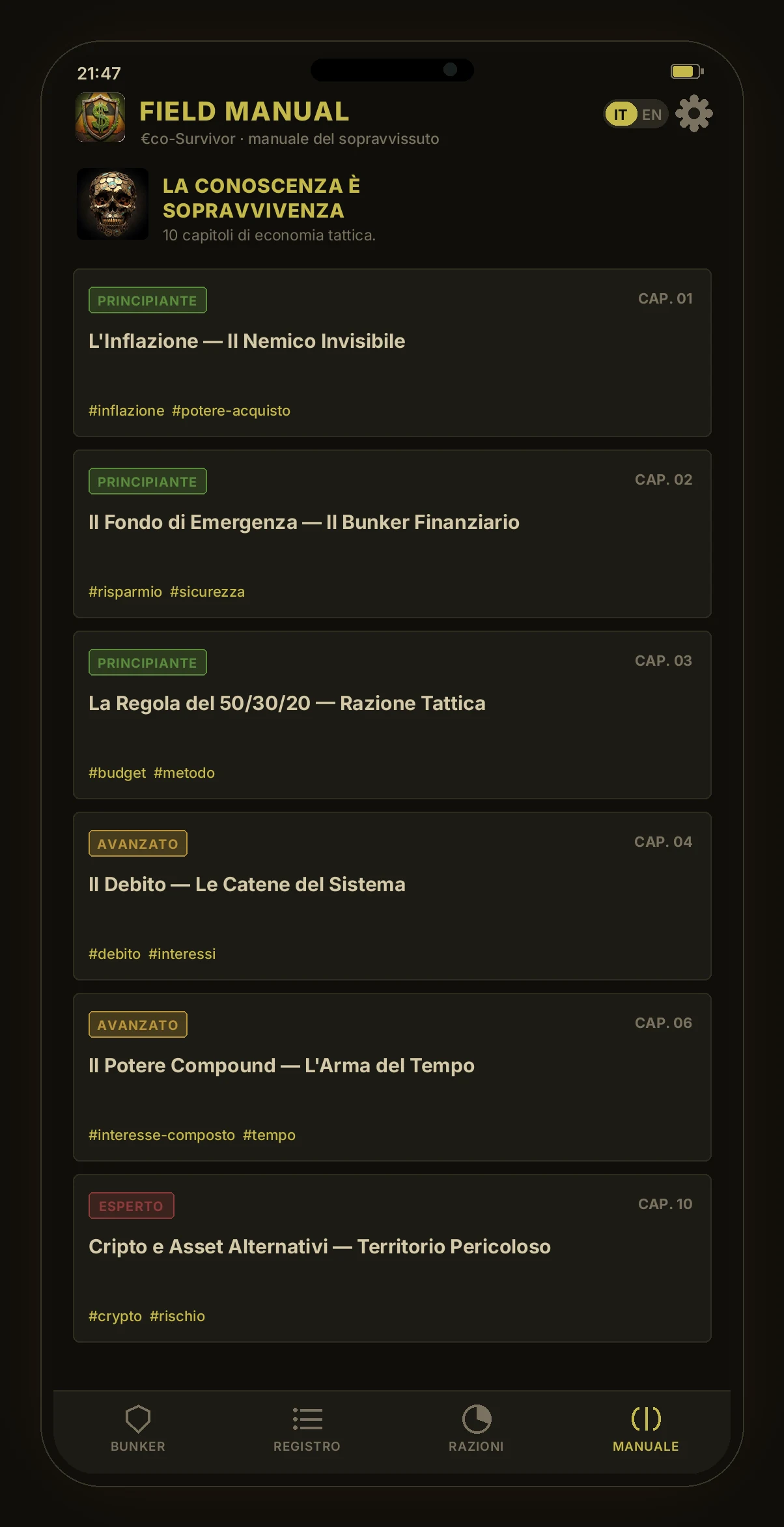
- MANUAL (Field Manual) — the ten chapters of tactical economics, sorted by difficulty (beginner, advanced, expert). Each one opens in a pop-up card with the full lesson.
How to use it
The flow, from the first launch onward, is short by design:
- 1 · THE INITIAL PACT — on first launch the app shows a disclaimer: €co-Survivor is an educational tool, not financial advice. You scroll through it, tick “I have read and accept” and carry on. The language starts in Italian, with an IT/EN switch always within reach.
- 2 · LOGGING AN ENTRY — the red ADD button opens the modal: pick expense or income, tap the category (food, shelter, transport, fuel… or work, trade, investment), type in the amount and a note, and hit “Log it in the bunker”. Totals, chart and index update instantly.
- 3 · SETTING THE RATIONS — in the Rations tab you tap a category and set the monthly limit. From then on the bar tells you at a glance how much room you have left before the alert.
- 4 · KEEPING THE LOG — in the Log you filter entries and, with a long press, delete the wrong ones. No entry is carved in stone.
- 5 · STUDYING — when you have a minute, open a chapter of the Manual. They're short lessons, meant to be read on your phone.
- 6 · STARTING OVER FROM ZERO — from the settings, “reset everything” wipes transactions and budgets after a confirmation. Handy for closing out a period or starting clean.
> ui: react native + expo (expo-router) · typescript
> storage: asyncstorage (device) · transactions · budgets · lang
> network: none · offline-only · no account · no cloud · no ai
> graphics: react-native-svg · inter font · feather icons
> core: survival-score 0–100 = savings ± ration discipline
Frequently asked questions
What technology is €co-Survivor built with?
It's a React Native app built with Expo (managed workflow, expo-router for navigation), written in TypeScript. It isn't native Kotlin, nor a web app packaged with Capacitor: it's a single codebase that generates the Android app.
Where does my data go?
It stays on your phone. Transactions, budgets and the language preference are saved locally with AsyncStorage. There's no server, no account and no cloud sync: your data never leaves the device.
Does it work without a connection?
Yes, always. €co-Survivor is offline by design: it makes no network calls to work. You can use it in airplane mode from start to finish.
Is there any artificial intelligence or advertising?
No. No AI analyzing your spending, no ads, no tracking. The survival index is a deterministic calculation that runs on the phone, not a remote model.
In the end it's just arithmetic — but told properly, arithmetic stops being boring and becomes a map. May your reserves outlast the winter, and your index stay green even when it's raining ash outside.
Notes
- Expo — a platform on top of React Native that provides tooling, ready-made libraries and a build flow without having to configure Android Studio and Xcode by hand. The “managed workflow” hides most of the native complexity. ↑ back to text
- expo-router — Expo's file-based navigation system: the folder structure defines the screens and their paths, the way the pages of a website work. ↑ back to text
- AsyncStorage — React Native's persistent key-value store: it saves small amounts of data on the device, asynchronously, without a real database. Ideal for settings and local lists. ↑ back to text